Foldable
Pull the device open and watch the Werk app grow with it. Fully open, the job list and detail sit side by side. Half open, the device becomes a workspace: tick off work steps below while keeping the job and its progress in view above.
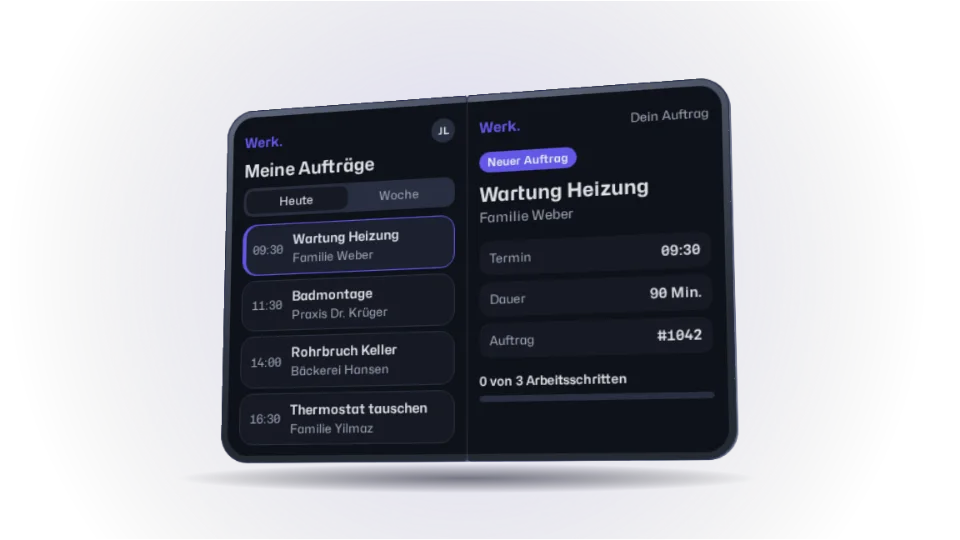
Heating service
Weber family
- Time
- 09:30
- Duration
- 90 min
- Job
- #1042
Bathroom fitting
Dr. Krüger's practice
- Time
- 11:30
- Duration
- 180 min
- Job
- #1043
Burst pipe in the cellar
Hansen bakery
- Time
- 14:00
- Duration
- 60 min
- Job
- #1044
Replace thermostat
Yilmaz family
- Time
- 16:30
- Duration
- 45 min
- Job
- #1045
My jobs
My jobs
The live demo needs JavaScript and 3D transforms. The picture shows the unfolded device; the explanation below reads fine without them.
- Opening angle
- 180°
- Display
- Inner
- Columns
- 2
- Frames/s
- –
- Technique
- CSS 3DDOM
How it works
The app derives its layout from the display it is running on. The narrow outer display shows the job list. Half open, each half has its own purpose: tick off work steps below while the job stays visible above and its progress updates immediately. Fully open, list and detail sit side by side, with the column border exactly on the fold.
Selection and work steps stay with each job as you fold. You can untick any step; reloading starts the demo afresh. The controls offer the same steps outside the device, too. To avoid flickering at the switching point, the layout only switches back a little past it. CSS 3D turns the two device halves; the app is a real, translatable interface, and a canvas only draws the shadow underneath.